TachoSoft software

Your entire tachograph workshop
in one system.

TachoSoft is a complete program for tachograph workshops. It keeps all the documentation — from workshop card download, through analysis and control of technician work, calibration and the register, all the way to printing a calibration label with a QR code and issuing an invoice in KSeF (Polish National e-Invoice System) — all in one program, without retyping data. This combination of solutions makes TachoSoft a unique tool for tachograph workshops.

Written by a tachograph technician with more than 15 years of experience — not by an outside developer. Every feature comes from real workshop practice and is used every day in our own workshop.
Installed locally at your workshop — your data stays with you. Choose a perpetual licence (you own it outright) or an annual subscription with a lower upfront price; add modules as you need them.
1
program — complete documentation: card → control → register → label → invoice
4 in 1
computer, workstations, Optimo tablet and phone on one database
48 h
of offline work on workstations and the tablet, with a valid QR code
7
interface languages: PL, EN, DE, FR, ES, IT, CS
// Why TachoSoft

Why workshops choose TachoSoft

Ten concrete reasons — you can check every one of them in the program.

01

All your documentation in one program

It covers the full path: workshop card download → analysis → calibration → register → calibration label with QR → invoice in KSeF. No retyping data and no juggling several programs side by side.

02

It finds technician shortcomings before an inspection does

No driving, slot 2 not tested, error 0x15, calibration outside the branch (GPS from the card), a visit without calibration, time at the vehicle — the program finds all this itself and requires confirmation before saving and printing.

03

A calibration label that can't be forged

A cryptographically signed QR code (HMAC-SHA256), calibration data stored in the code itself, verification with a phone. Signing works offline too, and a non-working code will never be printed.

04

Works without internet

The program runs locally at your workshop. TachoSoft Connect workstations and the Optimo tablet work offline for up to 48 hours and sync by themselves when the connection returns — without duplicates.

05

Your customers' data stays with you

The database is on your computer, backups on your drive or NAS. No one can cut you off from your data, and an external service shutting down won't stop your workshop.

06

Four programs, one system

The office computer (TS), workstations and branches (TSC), the Optimo tablet at the vehicle (TSO) and the workshop phone (TSA) — all on one database, each workstation with its own card reader and printer.

07

The whole industry's know-how in one place

A shared knowledge base of tachograph workshops, built on the workshops' own know-how: installations, sensors, PTO, error codes, connectors, diagrams — created by TachoSoft, developed in cooperation with workshops and kept up to date by the users themselves, available online and offline.

08

Runs your whole business, not just calibrations

Invoices and credit notes in KSeF, payments from bank statements, payment reminders, costs and cash desk, a warehouse with PZ/WZ/RW/MM documents and FIFO pricing, driver cards.

09

Customers come back on their own

Calibration due-date reminders, appointment information and payment reminders — by SMS from your workshop's number (Android app) or via SMSAPI, and by e-mail in your own visual template.

10

Built by a technician, tested every day

Written by a tachograph technician with more than 15 years of experience and used every day in a working tachograph workshop. Interface in 7 languages, perpetual licence or subscription.

TachoSoftCloud-based program
Working without internetYes — locally, workstations offline for up to 48 hRequires a connection
Where customer data is storedOn your computer and NASOn the provider's server
If the provider shuts down the serviceThe program and data keep workingYou lose access
Buy to ownPerpetual licence or subscriptionDepends on the provider
// The system as a whole

TS, TSC, TSO and TSA — one system, one database

At its heart is TachoSoft on the computer in your workshop. The other programs are its “hands”: a workstation in the bay or at a branch, an Optimo tablet next to the vehicle and the workshop phone. Whatever you do on any of them ends up in the same database on your computer.

TS TachoSoft — workshop computer database · calibrations · invoices · stock notifications · workshop log Workshop knowledge base built by workshops · online and offline TSC TachoSoft Connect workstation · branch · card reader label printer · offline 48 h TSO TachoSoft Optimo tablet at the vehicle · from USB stick reader · Niimbot Bluetooth · offline TSA TachoSoft Android SMS from workshop number · visits stock with scanner · invoice photos Customers SMS / e-mail: deadlines, visits, debts label verification via QR code KSeF FA(3) invoices · UPO · purchases Printers in TS network Niimbot · Brother · ESC/POS · A4 LAN / Tailscale offline sync Wi-Fi SMS / e-mail

Illustrative diagram. Tailscale is an encrypted VPN — no need to open ports on your router.

TS
TachoSoft — main program
  • calibrations, workshop card, register, certificate
  • technician work control and workshop log
  • calibration labels, label editor, printers
  • invoices, KSeF, costs, cash desk, warehouse
  • notifications, appointments, e-mail
  • knowledge base, driver cards
TSC
TachoSoft Connect — workstation / branch
  • the full TachoSoft in the workstation window
  • finds TS on the local network by itself
  • remotely via Tailscale
  • its own card reader and card login
  • its own label printer and A4 printing
  • offline for up to 48 h, then syncs
TSO
TachoSoft Optimo — tablet
  • runs from a USB stick, no installation
  • first-run setup wizard
  • built-in Tailscale, QR code login
  • Optimo card reader, on-screen keyboard
  • Niimbot via Bluetooth, two-colour printing
  • calibration and calibration label offline at the vehicle
TSA
TachoSoft Android — phone
  • SMS to customers from the workshop SIM card
  • reminders, payment reminders, appointments
  • list of scheduled appointments
  • warehouse: EAN/QR scanner, PZ, RW, FIFO
  • photos of invoices and receipts for costs
  • KSeF invoice QR reading, 7 languages
TSS
TachoSoft Szkolenie — edition for training centres

A separate edition for organisations that train tachograph technicians — not part of the workshop system. Trainees practise card reading, calibration and workshop documentation on real software, and the examiner sees their work. Every label and document carries a “TRAINING” watermark.

More about TachoSoft Szkolenie →
// Technician work control

Technician shortcomings are visible at once

TachoSoft reads from the workshop card not only the calibration data, but also what the technician actually did at the vehicle. Based on that, it flags errors itself — before the document reaches the customer, or an inspector.

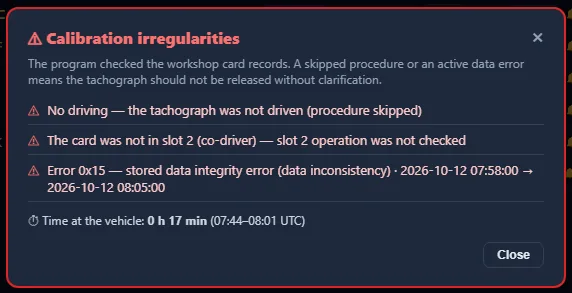
  • !No driving — the tachograph was not driven, so the check procedure was skipped.
  • !Slot 2 not tested — no card was inserted in the second driver slot.
  • !Error 0x15 and other data errors — an active integrity error in stored data, with the exact time it occurred.
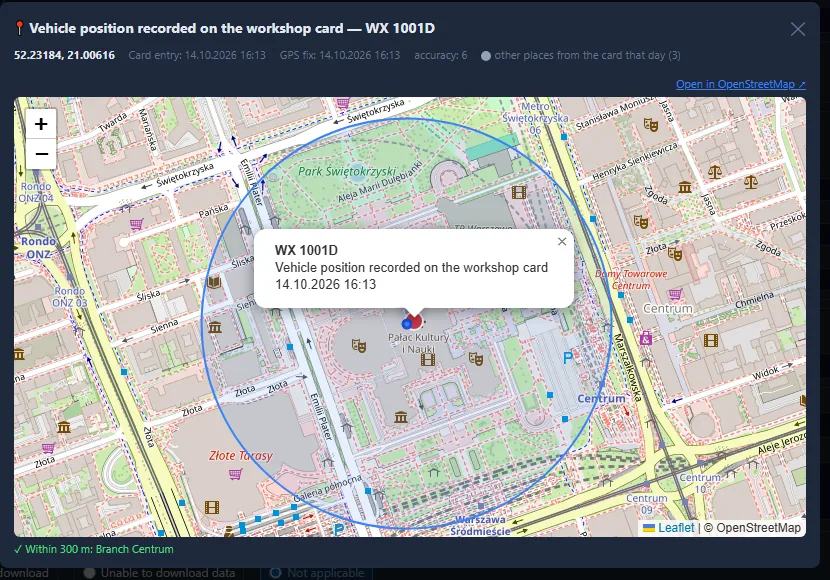
  • !Calibration outside the branch — the GNSS position stored on the card (G2V2) is compared with branch addresses, 300 m radius.
  • !Visit without calibration — the card was used in a vehicle, but there is no calibration in the program: create an entry or skip it.
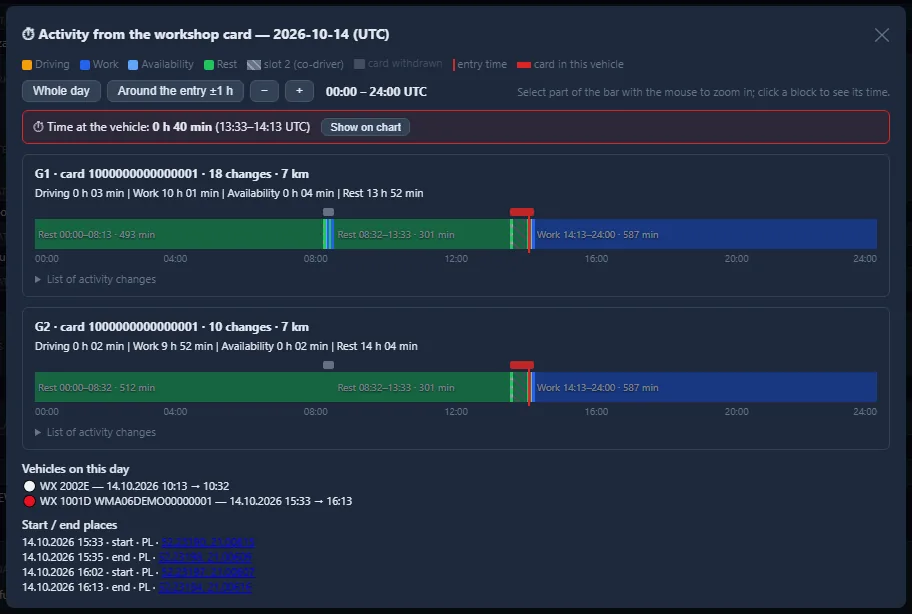
  • ✓Time at the vehicle and card activity — a zoomable chart shows what happened in the tachograph and when.
  • ✓Workshop log — card insertions and withdrawals, calibration changes, printouts and irregularities from TS, TSC and TSO in one place.

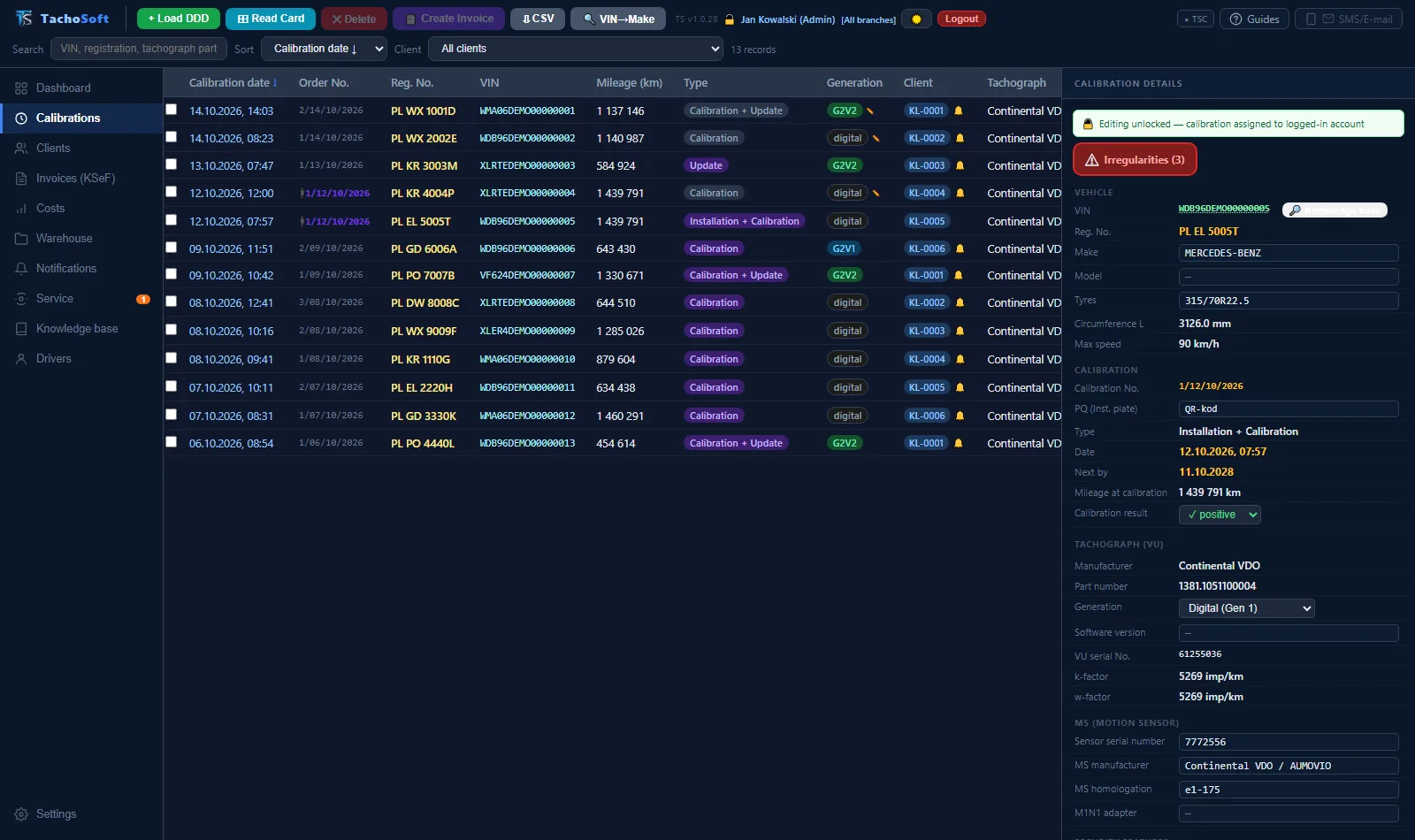
A calibration with a shortcoming gets a red Irregularities button, and saving and printing documents require deliberate confirmation.

TachoSoft — list of calibration irregularities detected from the workshop card (demo data)
Irregularities detected from the workshop card — demo data.
Vehicle position from the workshop card on a map with a 300 m radius around the branch (demo data)
GPS position from the workshop card and a 300 m radius around the branch.
Workshop card activity chart: driving, work, rest, time at the vehicle (demo data)
Workshop card activity in the tachograph — time at the vehicle.
Calibration list and calibration details with a red irregularities flag in TachoSoft (demo data)
Calibration details with the red “Irregularities (3)” flag.

All screenshots come from the demo version of the program — the workshop, customers, vehicles and numbers are fictitious.

// Workflow

From workshop card to invoice — no retyping

Data from the card goes straight into the calibration, register, calibration label and invoice. You check and fill in the gaps — the program does the rest.

1Card login

You insert your workshop card into the reader — in TS, at a TSC workstation or in the Optimo tablet. The program recognises the technician and logs them into their account, no password needed.

2Card download and analysis

Full DDD download with signature verification. The program opens a new calibration window: W, K, L, tyres, generation, tachograph software version, events — and checks for irregularities right away.

3Completing the data

The VIN decoder recognises the make and model, the part number — the tachograph and sensor, the knowledge base — type approvals. You pick the customer from the list (the program suggests it by VIN). The technician adds the seals and the daily clock error rate, and for G1 tachographs also the seals at intake and the software version.

4Calibration label with QR code

After a short countdown, the calibration label prints on the printer assigned to your workstation. The QR code is cryptographically signed — offline, too.

5Register and certificate

The calibration register record is filled in with data from the card, including the technician and card number. Calibration certificate in 6 languages. Print on any printer in the TS network.

6Invoice and KSeF

An invoice from the calibration with price lists for G1, G2V1 and G2V2, including tachograph software updates. Sent to KSeF and e-mailed to the customer with one click.

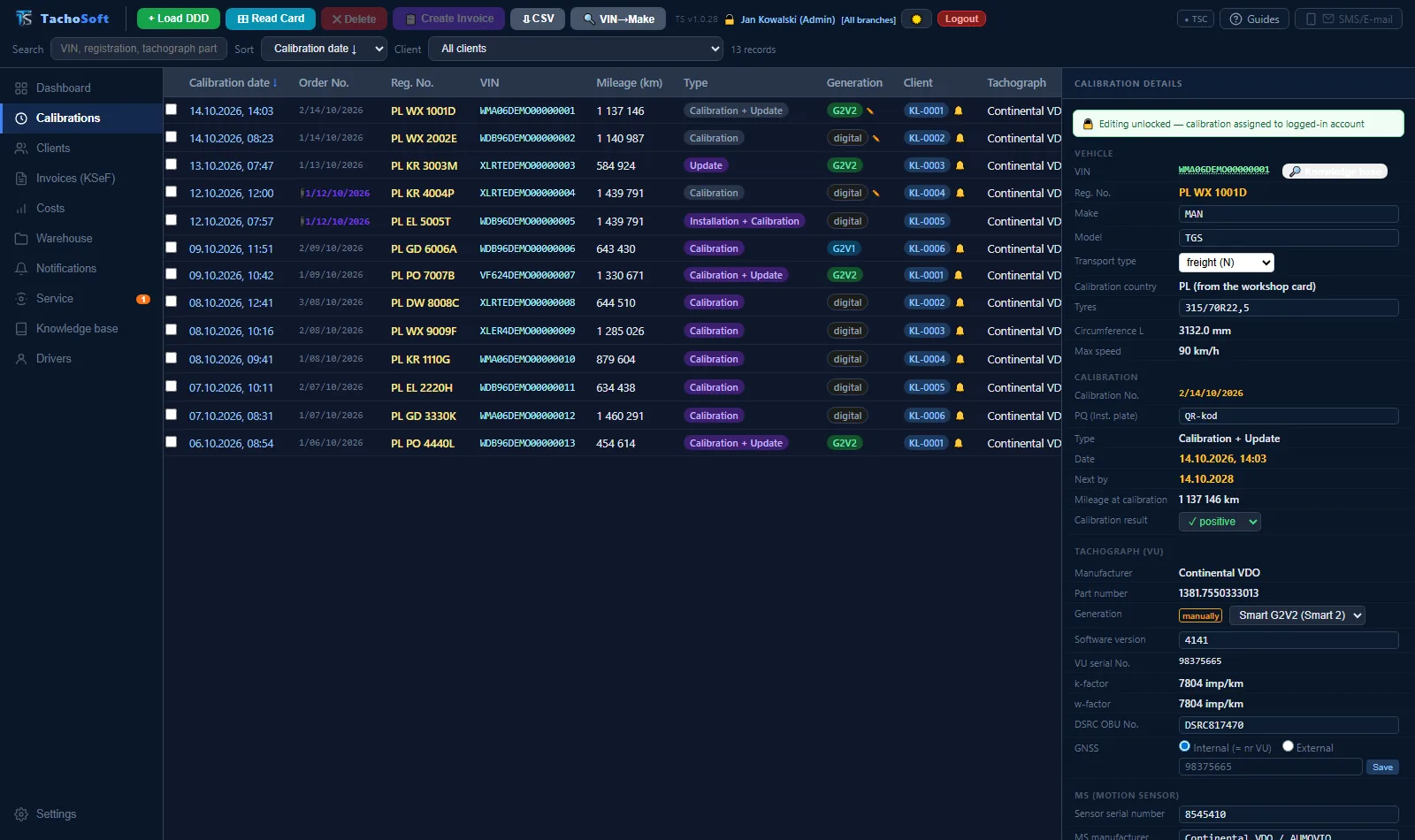
Calibration list and details of a G2V2 tachograph calibration in TachoSoft (demo data)
Calibrations: list and details — edit in place.
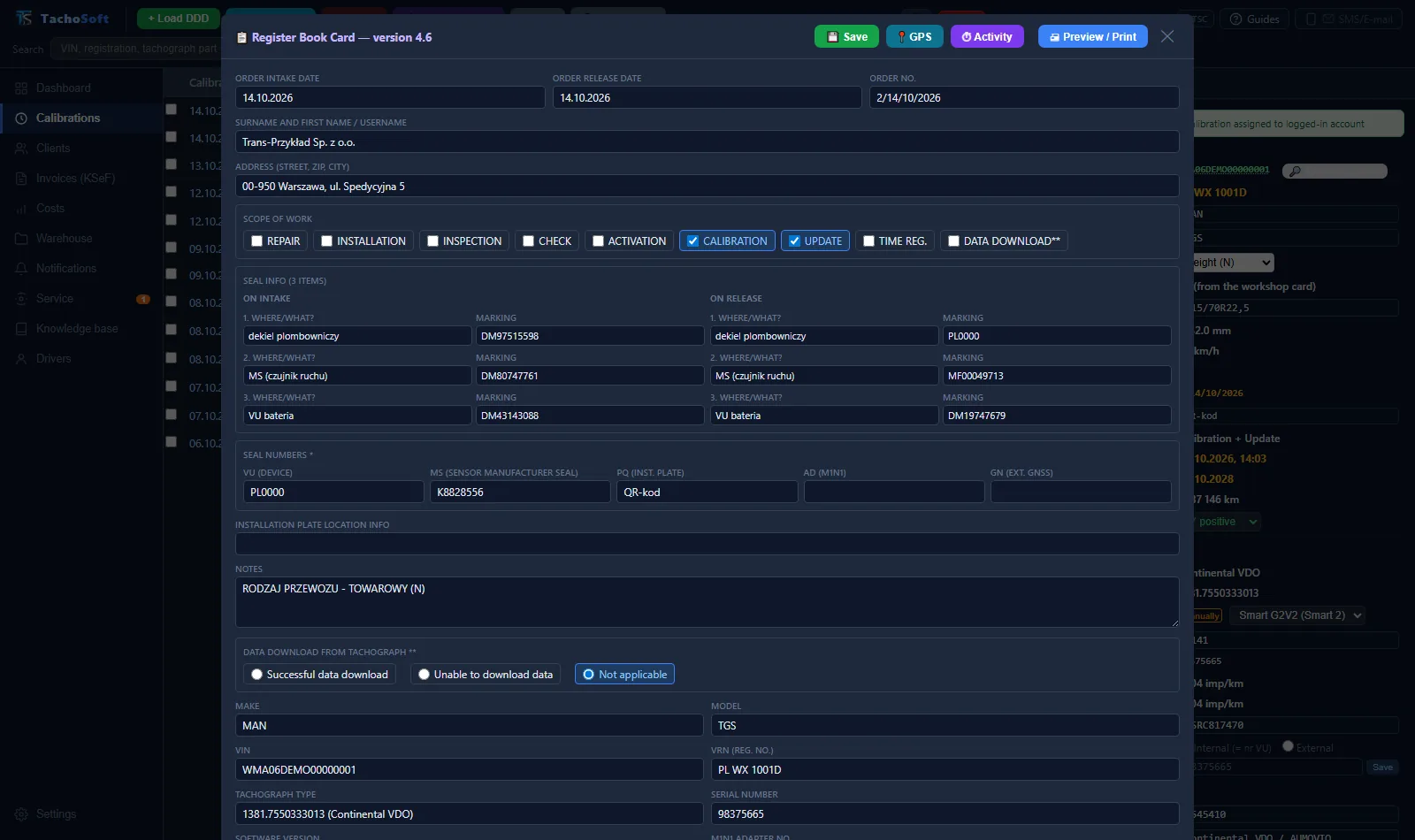
Calibration register record filled in with data from the workshop card in TachoSoft (demo data)
Calibration register record filled in from the workshop card.
// TachoSoft knowledge base

A shared knowledge base of tachograph workshops

TachoSoft created a database that the workshops themselves keep up to date. It is an integral part of the program: one click away from the calibration, online and offline.

  • ✓Vehicle installation data — tachograph, pulses, sensor and its length, gearbox, PTO ratios, DSRC, configuration.
  • ✓Motion sensors, error codes, connectors — with cause and fix descriptions, pin drawings.
  • ✓Wiring diagrams — an editor with a connector library (DB9/DB25, OBD, DIN, A–D plugs).
  • ✓Submissions from workshops — anyone can add an entry or a correction; once approved, it reaches every installation of the program.
  • ✓Decoders driven by database rules — VIN, tachograph and sensor part numbers.
  • ✓Knowledge base API — access for TS and other programs.
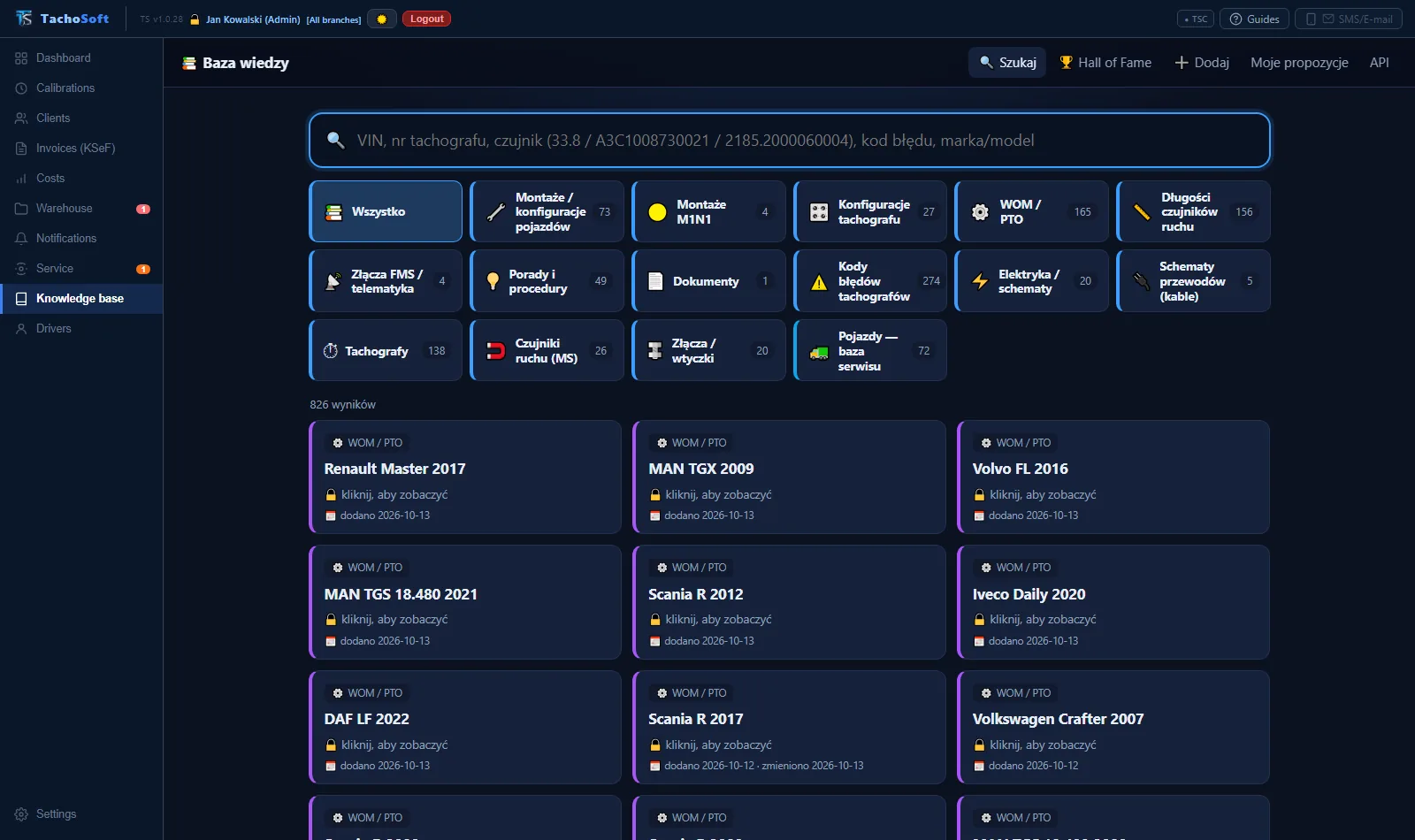
TachoSoft knowledge base — categories: installations, tachograph configurations, PTO, sensors, error codes, diagrams (demo data)
The knowledge base in the program — search by VIN, tachograph number, sensor, error code.
// Invoices, KSeF, costs

Invoicing and workshop accounting

The invoice is created from the calibration and goes to KSeF and to the customer. Payments are settled from your bank statement, and overdue amounts are chased with SMS and e-mail reminders.

KSeF FA(3) invoices

Invoices, credit notes and pro formas with separate numbering per branch. Submission to KSeF, KSeF number and UPO (official receipt confirmation), XML preview, import of purchase invoices from KSeF.

Payments from the bank

Importing a CSV statement automatically matches transfers to sales and purchase invoices. Payment QR code on the invoice.

Reminders and payment demands

A list of overdue unpaid invoices with actions: a reminder by e-mail or SMS, a pre-litigation payment demand as a PDF.

Costs and cash desk

Purchase invoices and receipts with attachments, cash receipts and payouts (KP/KW), cash balance, VAT settlement and a summary for your accountant (CSV/PDF).

Price list and discounts

Rates for G1, G2V1 and G2V2, your own services, discounts for regular customers — applied automatically.

Customers by tax ID

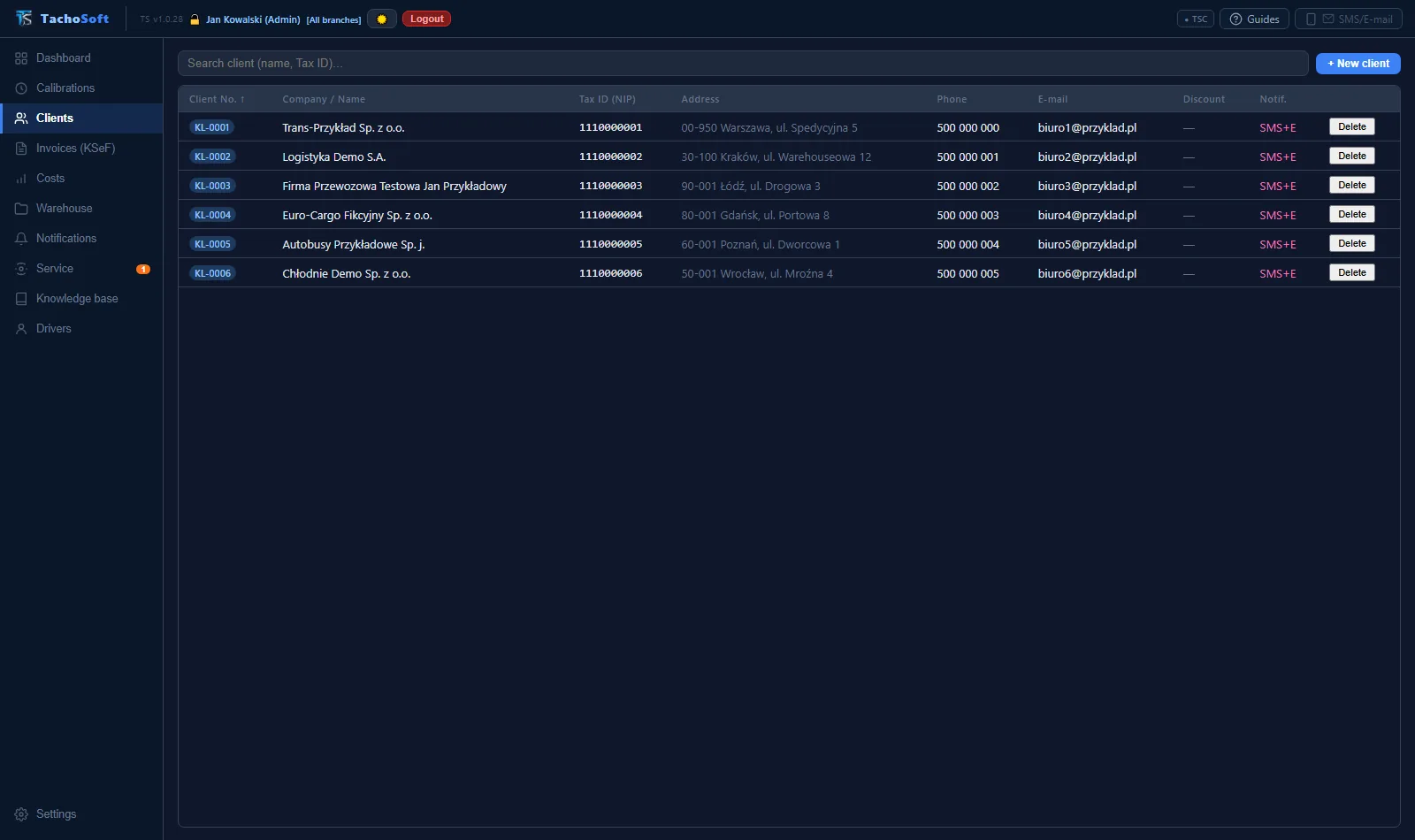
Company data from the Polish VAT White List, VIES, CEIDG (Polish business register) and KRS (National Court Register). Choice of notification channel: SMS, e-mail or both.

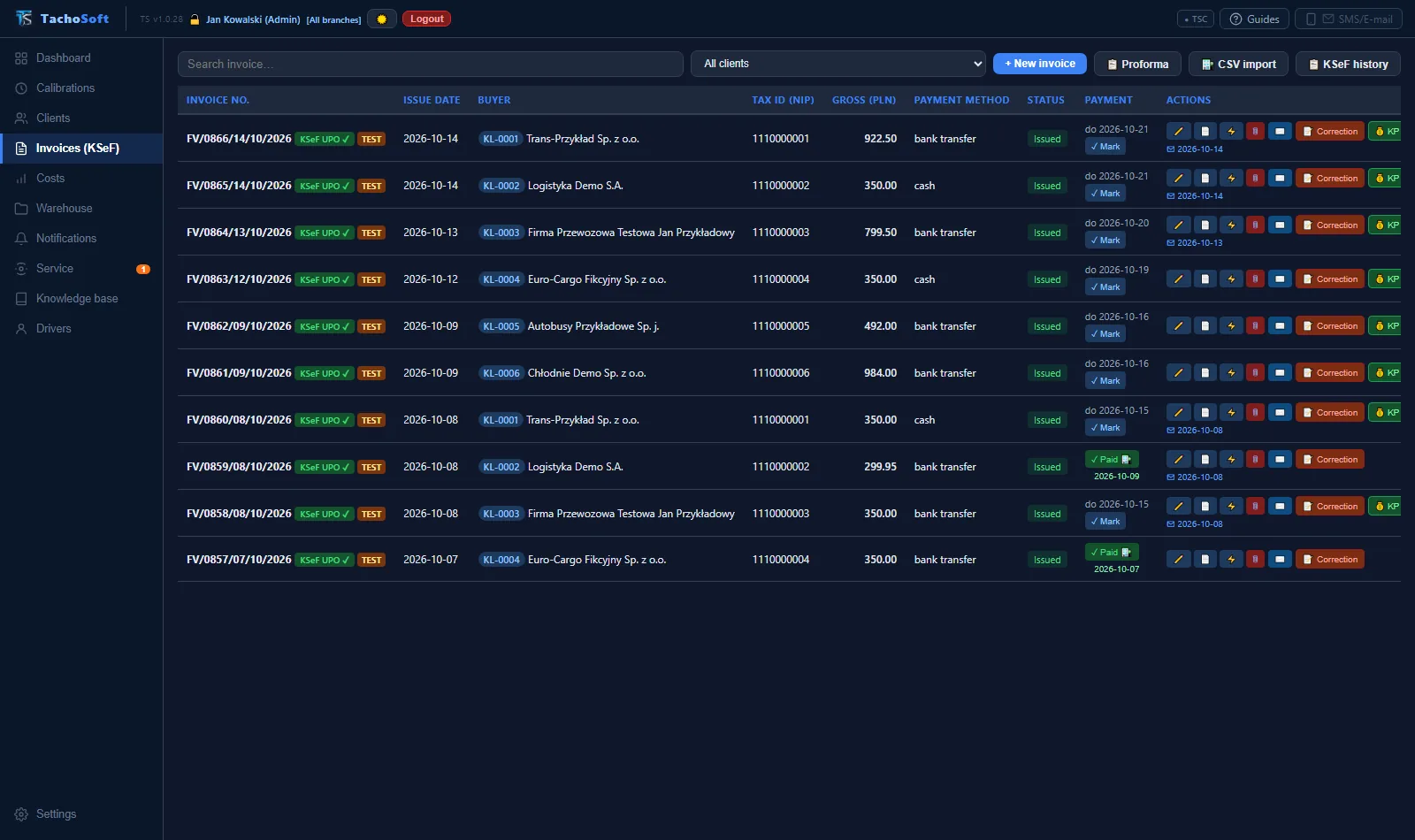
Invoice list with KSeF and payment status in TachoSoft (demo data)
Invoices: KSeF status, payments, due dates.
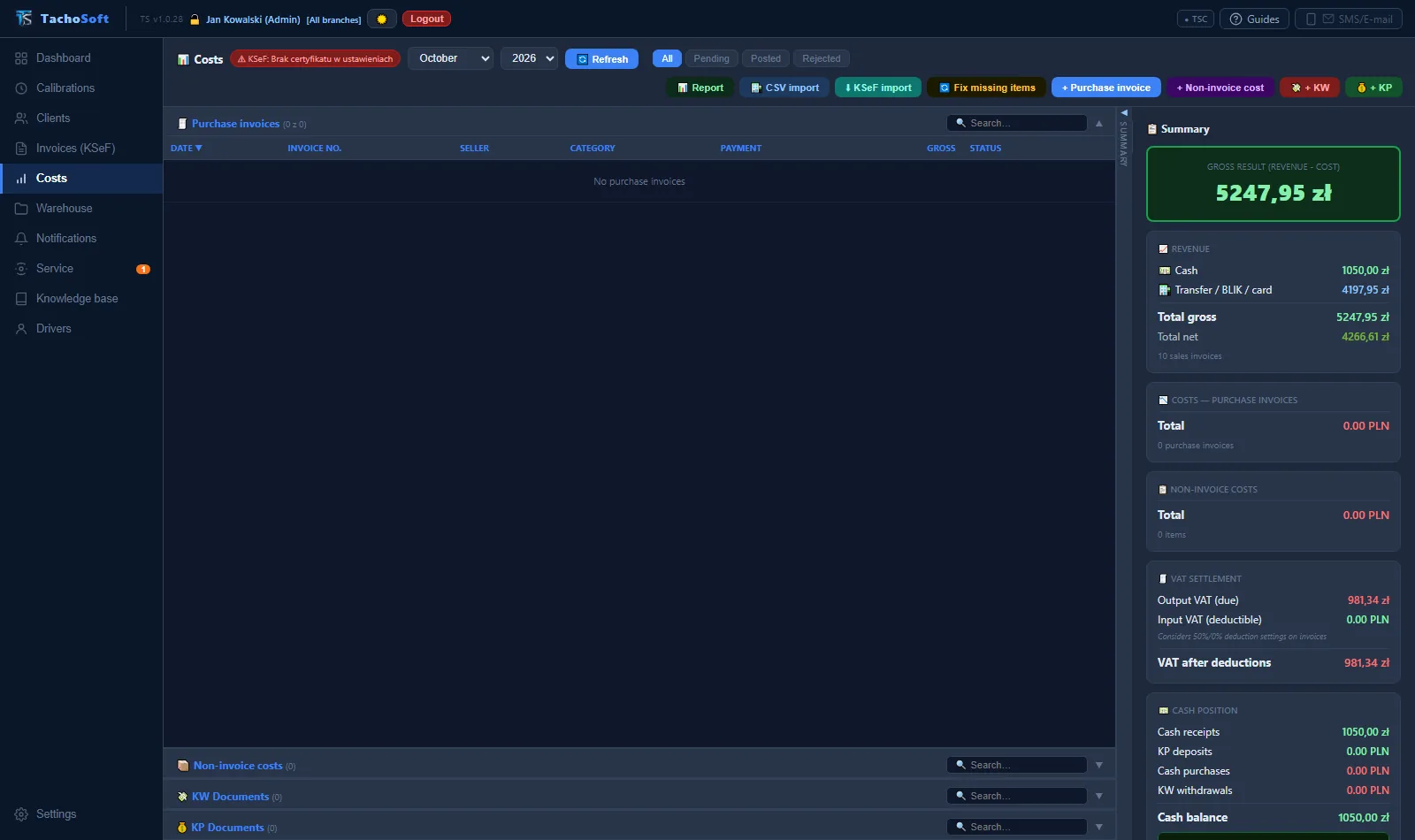
Costs module: revenue summary, VAT, cash balance in TachoSoft (demo data)
Costs: revenue, VAT, cash desk.
// Extended warehouse

Complete inventory management

A warehouse linked to calibrations and invoices: parts used during a calibration are deducted from stock automatically, and sales and purchases create warehouse documents.

  • ✓PZ (goods receipt), WZ (goods issue), RW (internal issue), PW (internal receipt), MM (transfer), BO (opening balance) documents — multiple line items, approval, PDF and CSV.
  • ✓FIFO pricing — receipt batches, a warning when selling below purchase price.
  • ✓Branches — a shared item catalogue, separate stock levels and numbering, MM transfers.
  • ✓EAN and QR — scanner in the program and on the phone (TSA), item labels.
  • ✓Stocktaking, stock as of a given date, minimum stock levels — alerts on the dashboard, too.
  • ✓Import stock levels from other programs — from CSV or Excel files, with column mapping, import history and undo.
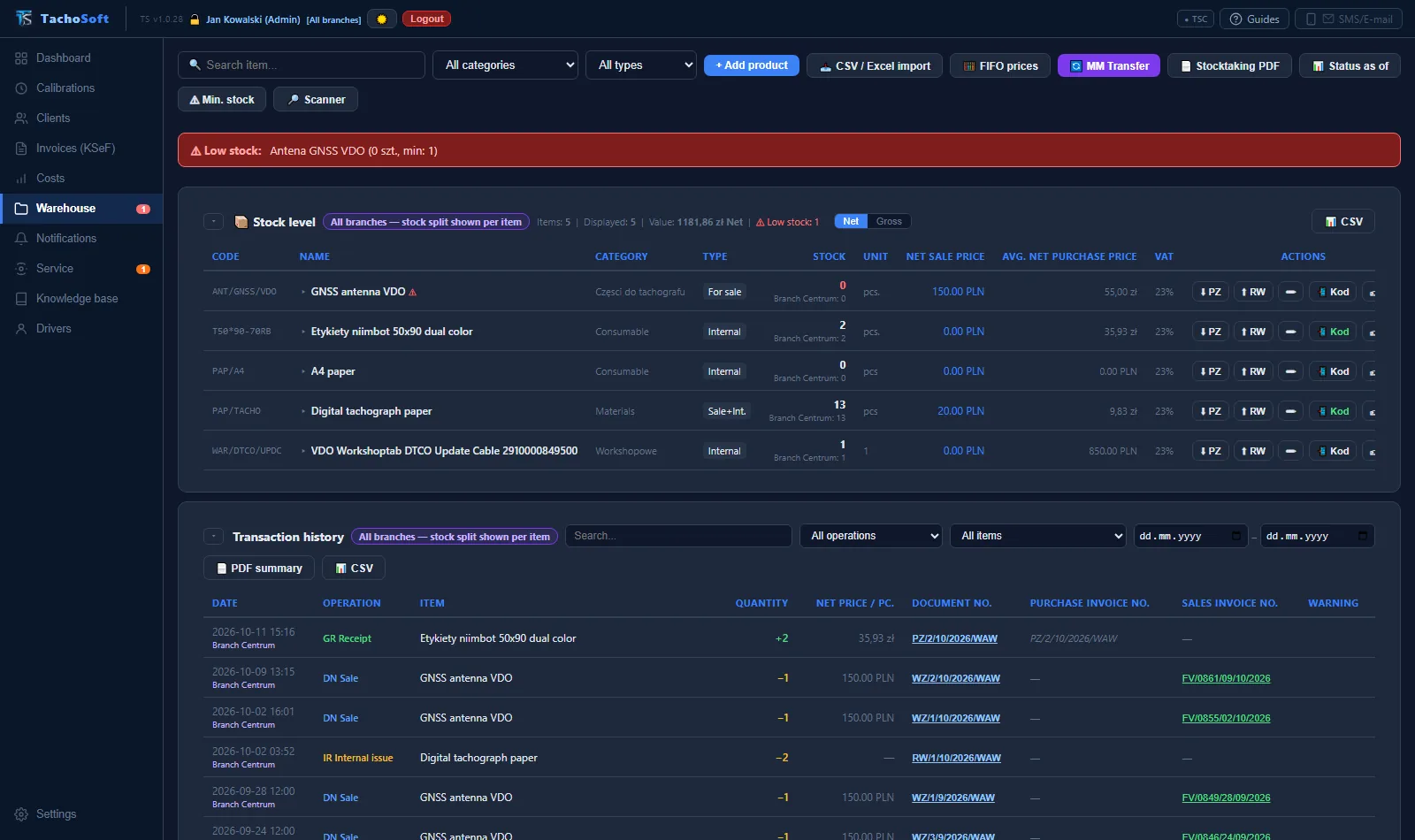
TachoSoft warehouse: stock levels, FIFO pricing, PZ, WZ, RW transaction history (demo data)
Warehouse: stock, FIFO, documents and transaction history.
// Notifications, reminders, appointments

Your customers remember the deadline — because you remind them

Reminders about expiring calibrations, payment reminders and information about booked appointments go out by SMS or e-mail — using your own templates.

SMS via SMSAPI

Sending through the SMSAPI.pl gateway — fast and in bulk, no phone needed.

SMS from the workshop phone (APK)

The TachoSoft Android app sends SMS messages from the workshop's SIM card — customers see your number. The queue is checked in the background every 15 minutes.

E-mail with your own look

SMTP or Gmail. A visual template editor: logo, colours, footer. Invoices, reminders and payment reminders in your own branding.

Your own templates

SMS and e-mail templates with variables: registration number, VIN, date, days to deadline, branch, technician, branch phone.

Appointment calendar

Appointments with time, customer, vehicle and branch. A booking confirmation and a reminder X days before — SMS, e-mail or both, set separately for each appointment.

Workshop reminders

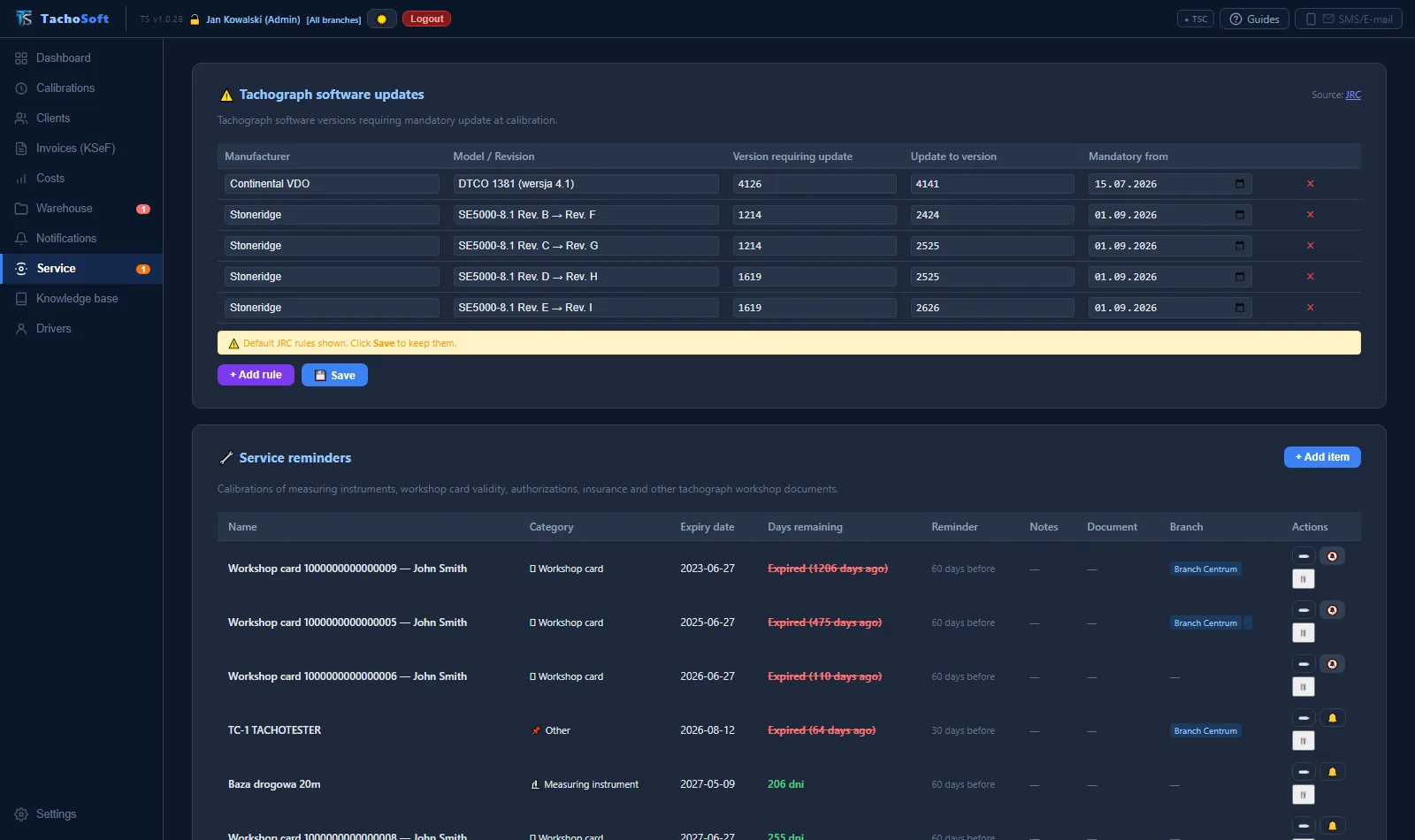
Workshop card validity, instrument legal verifications and workshop documents — with a bell icon and a list at startup.

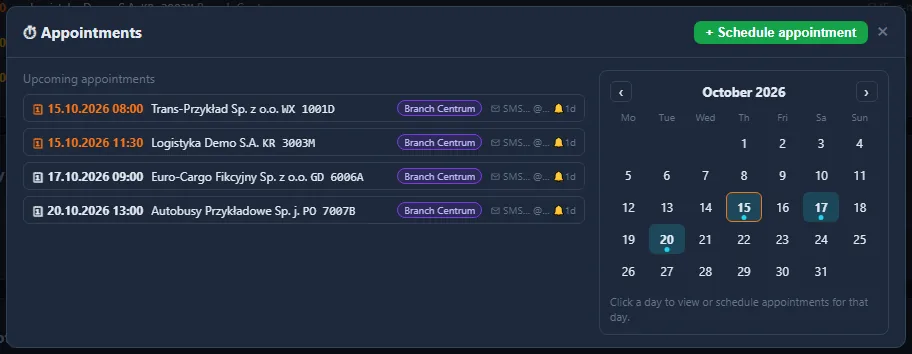
Calendar of booked appointments with SMS and e-mail notifications in TachoSoft (demo data)
Calendar of booked appointments with notifications.
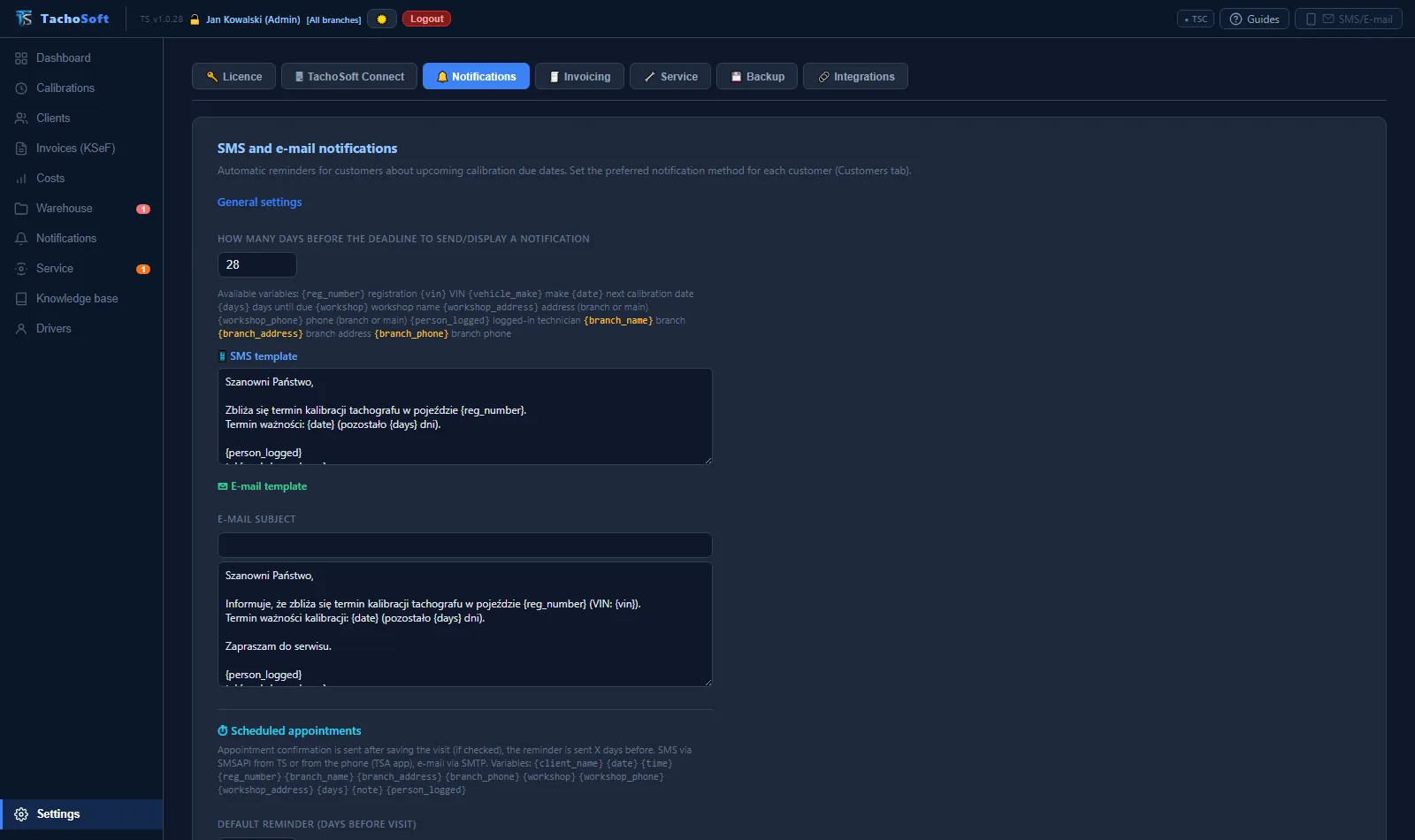
SMS and e-mail notification template settings in TachoSoft (demo data)
Your own SMS and e-mail templates.
// Printers and calibration labels

Print on any printer in the TS network

Every TS computer, every TSC workstation and every TSO tablet has its own printer settings. The calibration label prints where the technician is standing — and the register or invoice on the printer in the office.

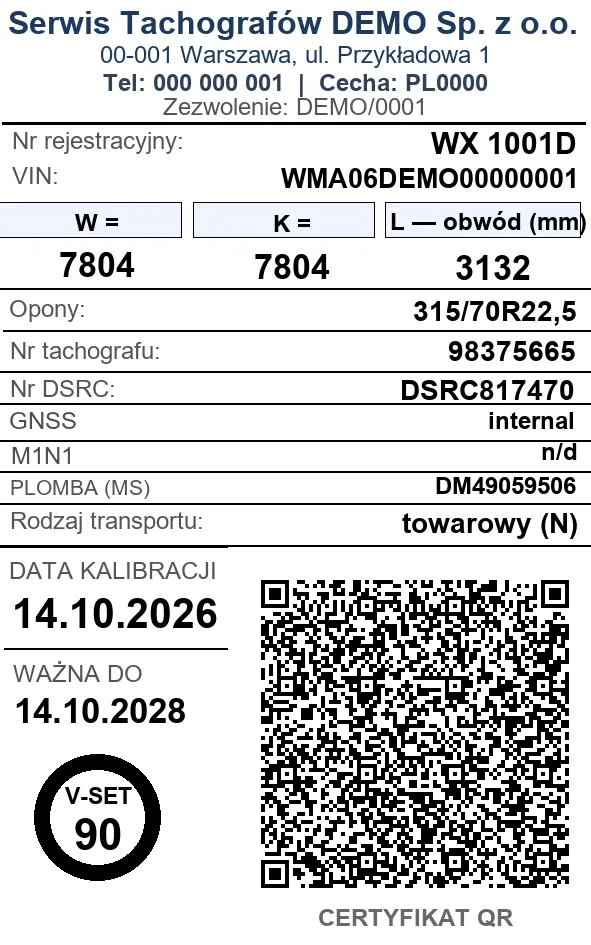
50×80 calibration label with a certificate QR code — demo data
50×80 calibration label with a signed QR code — demo data.
  • ✓Niimbot B21 Pro, B3S, D110 — Bluetooth, USB, COM port, also via TSC and TSO.
  • ✓Two-colour printing — on the Niimbot B21 Pro with red-and-black paper, the red elements of the calibration label print in red.
  • ✓Brother P-touch PT-P750W — 24 mm tape via Wi-Fi or USB, with tape status.
  • ✓ESC/POS printers via COM port.
  • ✓Registers, invoices and A4 documents — preview and print on this computer's printer or on the TS computer's printer; from the Optimo tablet straight to the printer in the office.
  • ✓Printer monitoring — battery, paper, number of labels left on the roll, end-of-roll warning.
  • ✓Sizes 50×30, 50×80, 50×90, custom sizes and P-touch tapes; crop editor and test print.
  • ✓M1N1 and battery labels as well as calibration labels for G1, G2V1, G2V2 and analogue tachographs.
// Our own calibration label editor

A calibration label designed for your workshop

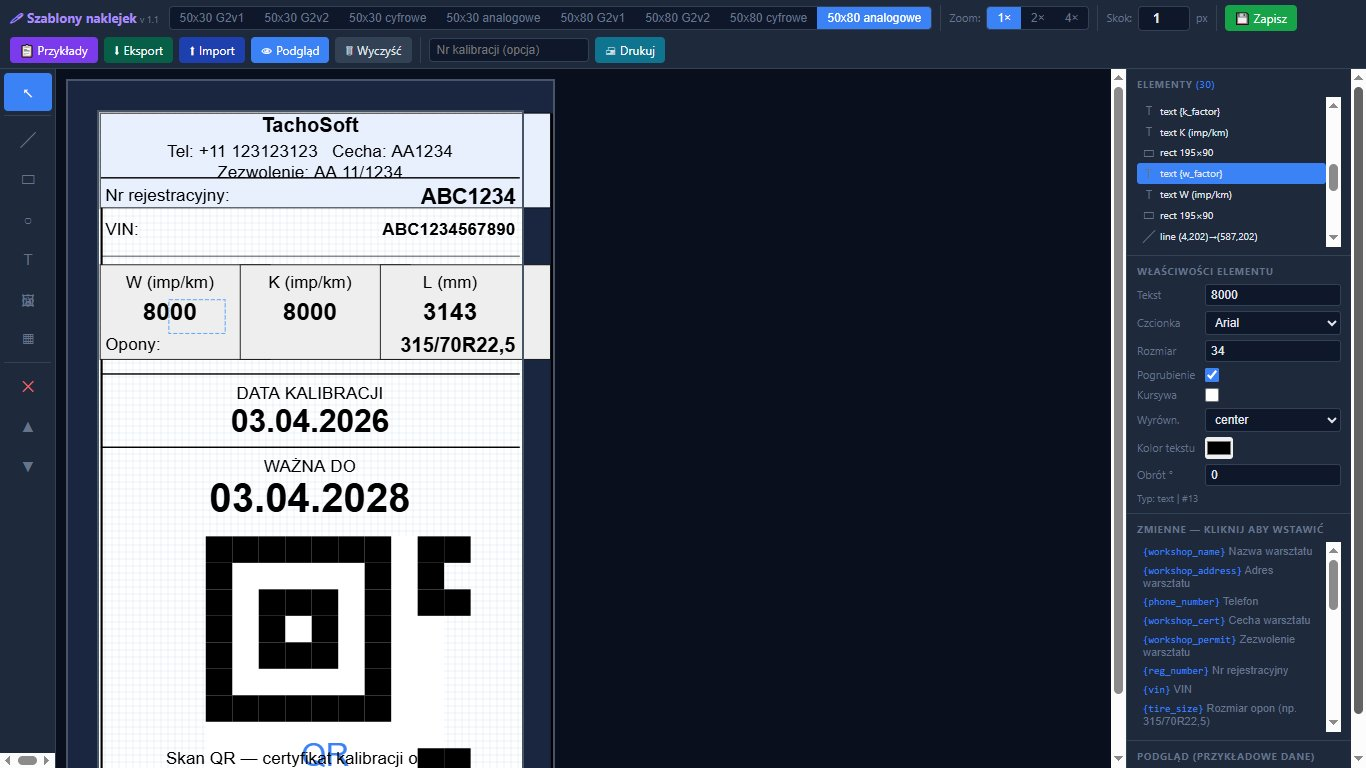
Text, lines, shapes, logos and images, tables, a black or red QR code, layers, undo/redo. You insert calibration and workshop data fields with one click; save finished designs as templates, export and import them.

TachoSoft visual calibration label editor
The calibration label editor in TachoSoft — the preview data is fictitious.
// QR verification

A calibration label that can't be forged

Every calibration label gets a short QR code with a cryptographic signature. The customer or an inspector checks its authenticity with a phone — without installing anything.

1

Calibration

You save the calibration in TS, at a TSC workstation or on a TSO tablet — online or offline.

2

QR on the label

The program signs the data and prints a unique QR code. Without a valid signature, the code will not be printed.

3

Scan with a phone

The code leads to a verification page that opens on any phone.

4

Confirmation

The signature confirms the authenticity of the calibration data — in many languages.

The data is in the code, not on a server

Vehicle and calibration details are encoded in the QR code itself and signed (HMAC-SHA256). They cannot be altered or forged, and they can only be read by someone with physical access to the calibration label.

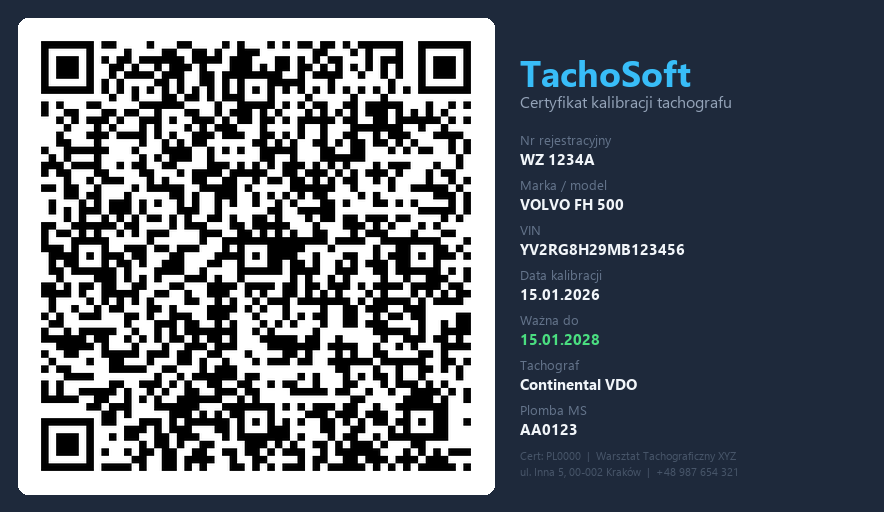
Sample calibration certificate with a QR code — fictitious data (TachoSoft)
Sample QR certificate — fictitious data.
// Online and offline

You can work without internet, too

TachoSoft runs locally at your workshop, and the workstations and tablet have their own offline mode. No signal at the vehicle doesn't stop the job.

Your data stays with you

The database is on the computer in your workshop. Automatic and manual backups (ZIP) stay on your drive or NAS. No external server holding your customers' data.

Offline for up to 48 h

TSC and TSO read the card, fill in the calibration, register and M1N1 installation, decode the VIN without internet and print a calibration label with a valid, signed QR code.

Sync without duplicates

When the connection returns, calibrations get their numbers in TS. Re-sending does not create copies, and a later card download in TS completes the same calibration.

Offline knowledge base

A copy of the knowledge base works without internet; corrections arrive after syncing.

Branches via Tailscale

Remote workstations connect over an encrypted VPN, without opening ports. The TS page is transferred compressed — faster on a weak connection.

Everything is logged

Printing, printer pairing and workstation errors go to the workshop log and the service logs — technical support can see what happened.

// Modules and features

Everything a workshop needs

The core of the program comes with every licence; you choose the Calibrations, Invoices, Warehouse, Notifications, Knowledge base and Drivers modules to suit your workshop.

CALIBRATIONS

Workshop card and DDD

Download via a PC/SC reader, import of DDD files with signature verification up to ERCA, card structure analysis, comparison of two cards with a PDF report.

CALIBRATIONS

Tachograph software updates

Software version “from/to” read from the card, manufacturers' required-update rules and an invoice line item.

CALIBRATIONS

Seals and M1N1

Seals on intake and release, seal search across the entire history, seal register, M1N1 adapter installation with the mounting location marked on a cab diagram.

CALIBRATIONS

Workshop equipment and documentation

Instrument list, reminders about legal verifications and documents, workshop log with printing and export.

CALIBRATIONS

Import from OTS

Migration of data from Open Tachograph Software (ZIP) and the OTS register book (PDF), with preview.

DRIVERS

Driver cards

Infringement analysis, working time, electronic working time records, business trips by country, GNSS map from G2 cards, DDD file integrity check.

CORE

Decoders

VIN → make, model, year (an uncertain model is not filled in automatically); part number → tachograph and sensor model.

CORE

Branches and users

Branches with a code and invoice prefix, technicians with a card and per-tab permissions, login by card or password.

CORE

Dashboard and notes

S/M/L tiles, calibration and sales statistics, results per branch and technician, notes — private, for a branch or for everyone.

CORE

E-mail

A mailbox in the program: inbox, sent, spam, replies with attachments in a visual template.

CORE

Guides and updates

Interactive step-by-step tutorials, TS and TSC updates as small packages, a changelog after each update.

CORE

Languages and currencies

Interface in 7 languages (PL, EN, DE, FR, ES, IT, CS), certificate in 6 languages, currencies PLN, EUR, CZK, GBP, USD, light and dark theme.

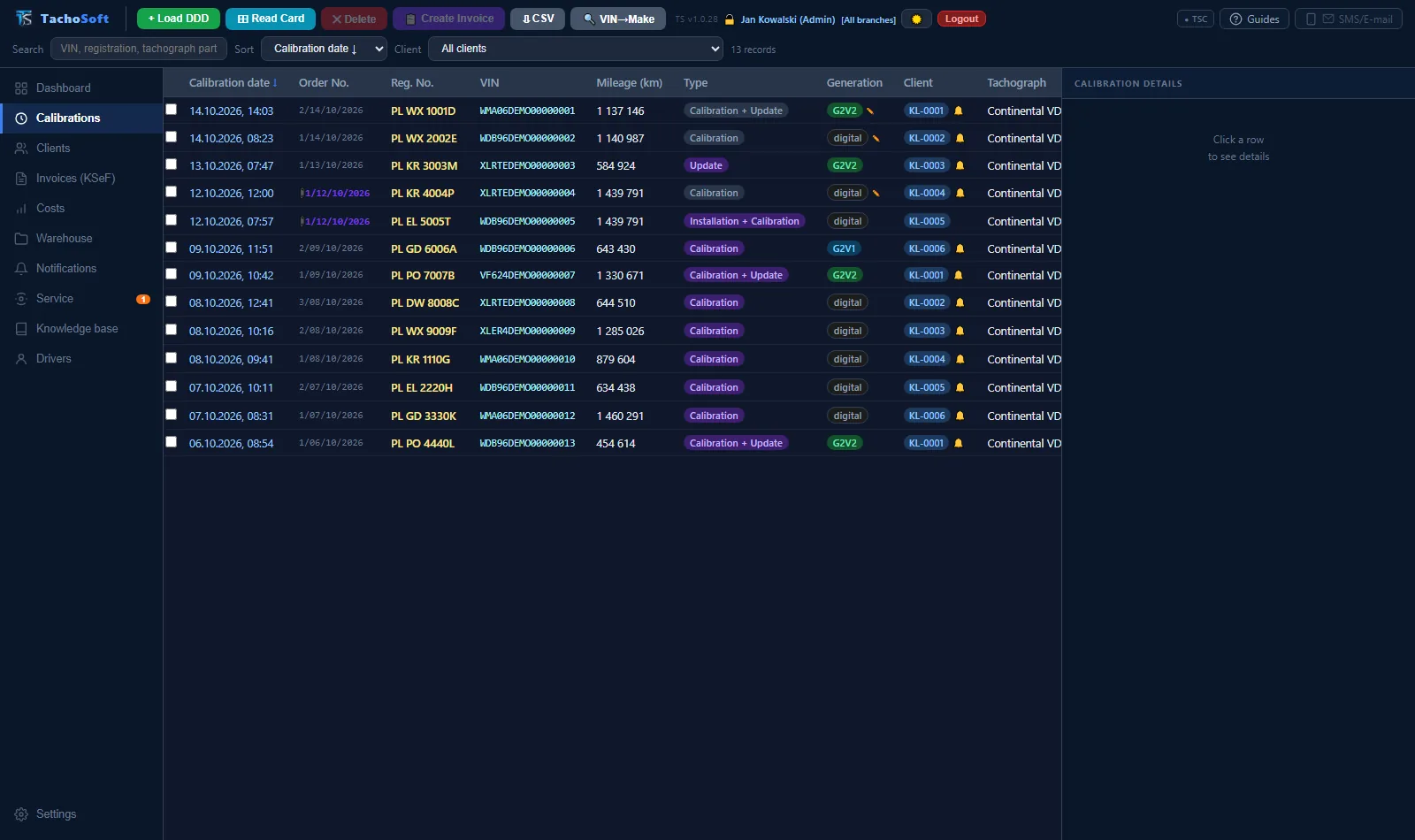
Calibration list in TachoSoft (demo data)
Calibration list.
Workshop: tachograph software updates and workshop reminders in TachoSoft (demo data)
Tachograph software updates and workshop reminders.
Customer records in TachoSoft (demo data)
Customer records.
// At a glance

Specifications

ProgramsTS · TSC · TSO · TSA
Input dataworkshop card · DDD · OTS
GenerationsG1 · G2V1 · G2V2
VU manufacturersContinental VDO · Stoneridge · Actia
Technician controlGPS · activity · 0x15 · slot 2
InvoicesKSeF FA(3) · credit notes · pro formas · UPO
WarehousePZ · WZ · RW · PW · MM · BO · FIFO
NotificationsSMSAPI · phone (TSA) · e-mail
Label printersNiimbot · Brother P-touch · ESC/POS
A4 printingany printer in the TS network
NetworkLAN · Tailscale VPN · multiple branches
OfflineTS locally · TSC/TSO up to 48 h
PlatformsWindows · Android · Optimo tablet
LanguagesPL · EN · DE · FR · ES · IT · CS
// Questions and answers

Frequently asked questions

What sets TachoSoft apart among tachograph workshop programs?

What is unique is the combination of solutions: TachoSoft keeps all of a workshop's documentation in one program — from workshop card download, through technician work control, calibration, the register and a calibration label with a signed QR code, all the way to an invoice in KSeF. It detects technician shortcomings from the card by itself (no driving, slot 2, error 0x15, calibration outside the branch based on GPS), works without internet, keeps customer data on the workshop's computer, combines the computer, workstations, Optimo tablet and phone into one system, has a shared knowledge base kept up to date by workshops, and handles invoices, payments, warehouse and SMS and e-mail notifications. It was written by a tachograph technician with more than 15 years of experience and is used every day in a working tachograph workshop.

Does TachoSoft keep the complete workshop documentation of a tachograph workshop?

Yes. TachoSoft keeps all workshop documentation in one program: workshop card reading, calibration, calibration register record, calibration certificate, calibration label with a signed QR code, seal register, workshop log, equipment list and the invoice in KSeF. Data from the card goes into every document without retyping.

Does TachoSoft send customers reminders about an expiring tachograph calibration?

Yes. TachoSoft finds expiring calibrations by itself and sends customers reminders by SMS and e-mail using your own templates — via the SMSAPI gateway or from the workshop’s own number through the Android app. The send history is saved and the program lists upcoming deadlines at start-up.

Does TachoSoft remind customers about booked appointments?

Yes. TachoSoft has a calendar of booked appointments. For each appointment you choose whether the customer gets a booking notice and a reminder before the visit by SMS, e-mail or both. Planned appointments are also visible in the phone app.

Does TachoSoft monitor payments and send payment reminders?

Yes. TachoSoft lists overdue invoices, sends payment reminders by e-mail and SMS, prepares a pre-court demand for payment in PDF, and matches a CSV bank statement to invoices, marking them as paid automatically.

Does TachoSoft have a warehouse module?

Yes. TachoSoft has a full warehouse: PZ, WZ, RW, PW, MM and BO documents (goods receipt, issue, internal issue, internal receipt, transfer, opening balance), FIFO purchase prices, separate stock per branch, EAN and QR codes, minimum stock, stock-taking and import of stock levels from other programs (CSV or Excel). Items used in a calibration or sold on an invoice are taken off stock automatically.

Does TachoSoft remind you about workshop card validity and equipment legalisation?

Yes. TachoSoft keeps service reminders: workshop card validity, legalisation and calibration of measuring equipment and workshop document deadlines, with a notification in the program.

What is TachoSoft?

TachoSoft is a program for tachograph workshops that keeps all of the workshop's documentation: workshop card download, analysis and control of technician work, calibration, register, certificate, calibration label with a signed QR code and invoice in KSeF (Polish National e-Invoice System). It also covers costs, warehouse, SMS and e-mail notifications, an appointment calendar and a shared workshop knowledge base. The system consists of four programs: TS (main computer), TachoSoft Connect (additional workstations and branches), TachoSoft Optimo (Optimo tablet) and TachoSoft Android (phone).

How does TachoSoft detect technician errors during calibration?

The program analyses the workshop card record: it checks whether the tachograph was driven (no driving), whether a card was in the second driver slot, whether the tachograph reports data integrity error 0x15, whether the GPS position from the card is within 300 m of the branch and how long the card was in the vehicle. It also detects use of the card in a vehicle with no saved calibration. A calibration with a shortcoming gets a red flag, and saving and printing require confirmation.

Does TachoSoft work without internet?

Yes. TS is installed locally at your workshop and your data stays on your computer. The knowledge base has an offline copy. TachoSoft Connect workstations and the Optimo tablet work offline for up to 48 hours: they read the card, save the calibration and print a calibration label with a valid, signed QR code. Once the connection is back, calibrations sync with TS without duplicates. Internet is needed only for external services such as KSeF, SMSAPI or e-mail.

Which tachographs does TachoSoft support?

First-generation digital tachographs (G1) and G2V1 and G2V2 smart tachographs from manufacturers such as Continental VDO, Stoneridge and Actia. The generation is detected automatically from the card and the part number.

Which printers does TachoSoft use for calibration labels and documents?

Calibration labels: Niimbot printers (B21 Pro, B3S, D110) via Bluetooth, USB and COM port, including two-colour red-and-black printing on the B21 Pro, Brother P-touch PT-P750W via Wi-Fi or USB, and ESC/POS printers. Registers, invoices and other A4 documents can be printed on any printer of the TS computer or of a TachoSoft Connect workstation in the TS network.

Does TachoSoft send invoices to KSeF?

Yes. The program issues invoices and credit notes in FA(3) format, sends them to KSeF, retrieves the KSeF number and UPO (official receipt confirmation), and imports purchase invoices from KSeF. The invoice is created directly from the calibration.

Can I work across several branches and on several computers?

Yes. The TS computer acts as the server, and additional workstations connect over the local network or the encrypted Tailscale VPN. Each workstation has its own card reader and its own label printer. Branches have their own order and invoice numbering and separate stock levels.

Which languages is TachoSoft available in?

The interface of TS and the Android app is available in 7 languages: Polish, English, German, French, Spanish, Italian and Czech. The calibration certificate can be printed in 6 languages.

What is the TachoSoft knowledge base?

It is a shared knowledge base of tachograph workshops, built on the workshops' own know-how — created by TachoSoft and developed in cooperation with the workshops that use it, continuously updated with their experience: vehicle installation data, motion sensors, PTO ratios, error codes, connectors, wiring diagrams and tips. Any workshop can propose an entry or a correction, and once approved it reaches all users.

Can I migrate data from Open Tachograph Software (OTS)?

Yes. TachoSoft imports data from Open Tachograph Software (ZIP archive) and from the OTS register book (PDF), with a preview before saving.

Does TachoSoft replace the tachograph calibration device?

No. The technician performs the calibration and the entries in the tachograph with the workshop’s own calibration device. TachoSoft takes over everything that happens next: it reads the workshop card, checks the technician’s work and creates the complete documentation — calibration, register record, certificate, label with QR code and invoice.


See TachoSoft in your workshop

Write or call — we'll show you the program live, pick the right modules and help you migrate data from your current program.

Ask about deployment →